AppySchedule by AppyShift

Build the week on one screen. Cover call-outs before the doors open.

Build the week on one screen with availability, time off, overtime and labor cost in view, then publish it to every phone. When someone calls out, the shift reopens for coworkers who can work it, with the best replacements ranked.

Included in every plan. See plans
  • 14-day free trial
  • No credit card required
  • Human response within 48 hours
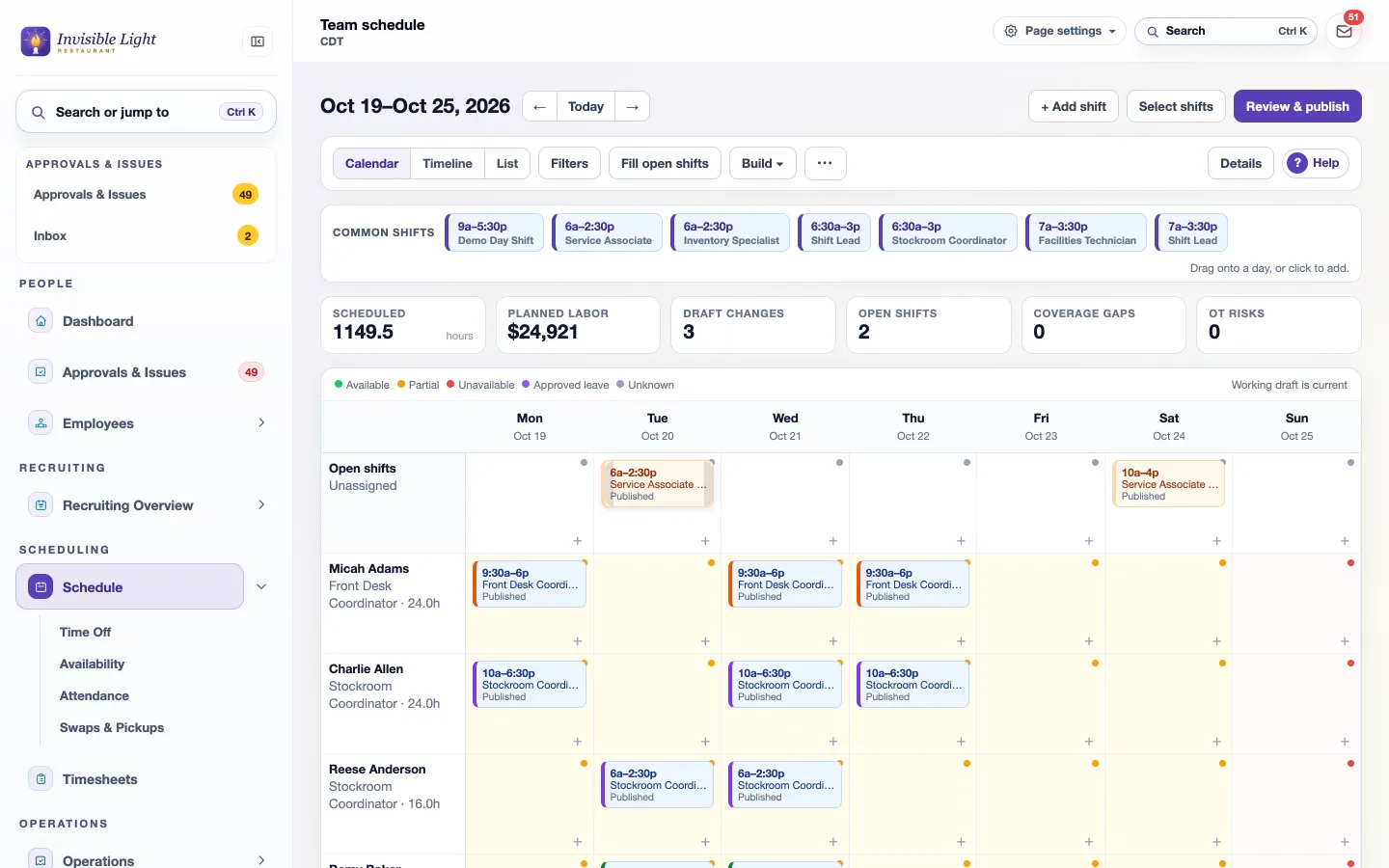
The AppyShift team schedule for a week with scheduled hours, planned labor cost, draft changes, open shifts, coverage gaps and overtime risks above the grid
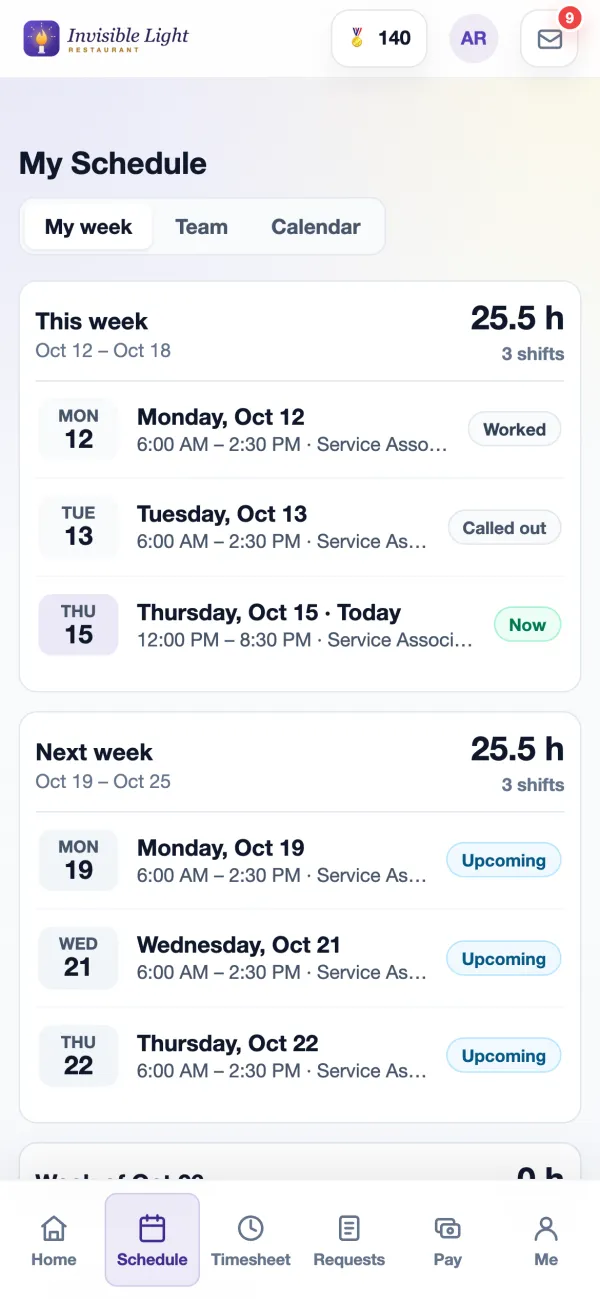
My Schedule in the AppyShift app: this week's hours and each shift with its status

At a glance

Everything AppySchedule does

A week you can drag

Drag a shift to move it, Alt-drag to copy it, pull an edge to change the hours. Your common shifts sit above the grid, ready to drop onto a day.

Suggested people

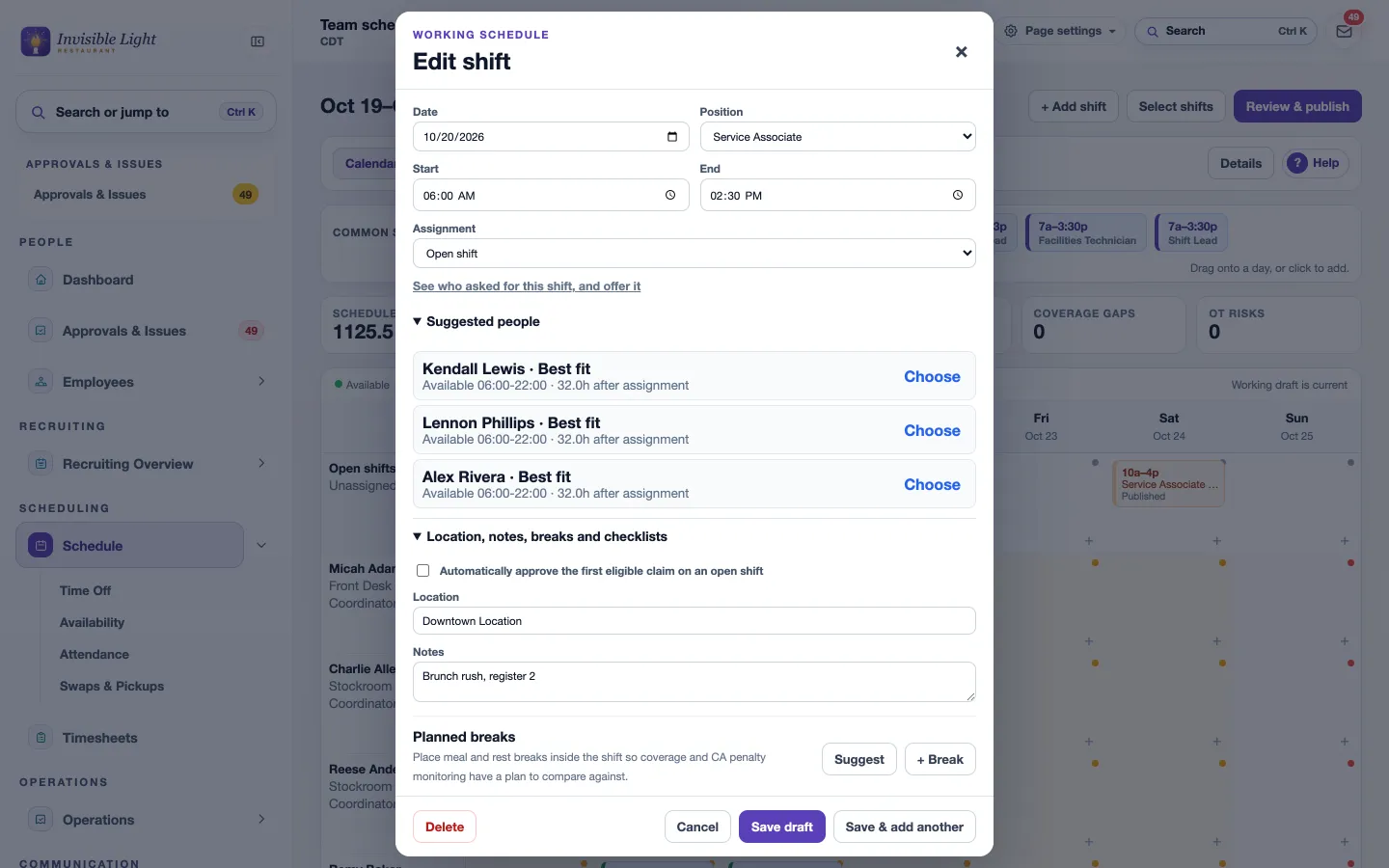
Open a shift and see who fits best, with their availability and their hours after the shift. Choose one, or leave it open.

Fill the week faster

Copy a week, fill every open shift at once, or let Forecast builder draft shifts from a sales forecast or a headcount plan. Nothing is published until you say so.

Numbers as you build

Scheduled hours, planned labor cost, open shifts, coverage gaps and overtime risks update with every change.

Minimum staffing

Say how many people you need each day and time, for one job or everyone. Short windows show as coverage gaps.

Labor rules on every shift

Overtime, rest between shifts, minors' hours, consecutive days and clopenings, set to warn or block. Start from a state or city preset.

Breaks in the plan

Suggest meal and rest breaks from your rules, and remind clocked-in employees a few minutes before each one.

Publish with a preview

See who is affected, the hours change and the cost before you publish the week, one day or one department. Only those people are told.

Availability and time off

Employees send their availability and preferences from the app; you approve them. Approved time off and unavailable hours stay out of the way.

Fair workweek

Flags short-notice changes and estimates predictability pay in the cities and states with those laws.

Print the day

A one-page chart of who works when, with breaks and open shifts, or a page for each person's week. Save it as a PDF.

Planned versus actual

Schedule Performance compares the published week with actual hours and cost, call-outs, break exceptions, sales or workload and shift feedback, then suggests changes for next week.

On every phone

Employees see My week, who else is working, a four-week calendar, and can add a shift to their phone's calendar.

Call-outs from the app or by text

Employees call out from the shift with a note, or text CALLOUT and a reason. The manager hears right away and the call-out is logged in Attendance.

Automatic repost, ranked replacements

A called-out shift can reopen the moment someone calls out. Each call-out shows who fits best by availability, rest, overtime risk and the job.

Offers in waves, bids and a waitlist

Send the shift to the strongest matches first, widening every 15 minutes. Assign a bid, waitlist a backup or decline, and everyone hears back.

Pickup rules you choose

Same position, location or department only, block overtime pickups, minimum notice, and auto-approve while someone stays under your overtime threshold.

Thanks that count Pro plan

Picking up a called-out shift can earn AppyRecognize points and the Shift Saver badge.

See it in the app

How it looks at a desk and on a phone

Every screen here is a real AppyShift page from our demo company, Invisible Light Restaurant. Open the demo to try it yourself.

Build and publish the schedule

For managers

The whole week on one screen

Every person, every day, colored by job. Drafts are marked until you publish. The numbers above the grid tell you the cost and the problems before anyone else sees the week, and the same schedule works on a phone.
  • Calendar, timeline and list views, with filters
  • Open shifts, coverage gaps and overtime risks counted for the week
  • Select several shifts to assign the best fit, make them open or delete them
The team schedule with planned labor of $24,360, draft changes, open shifts and the week's shifts by employee
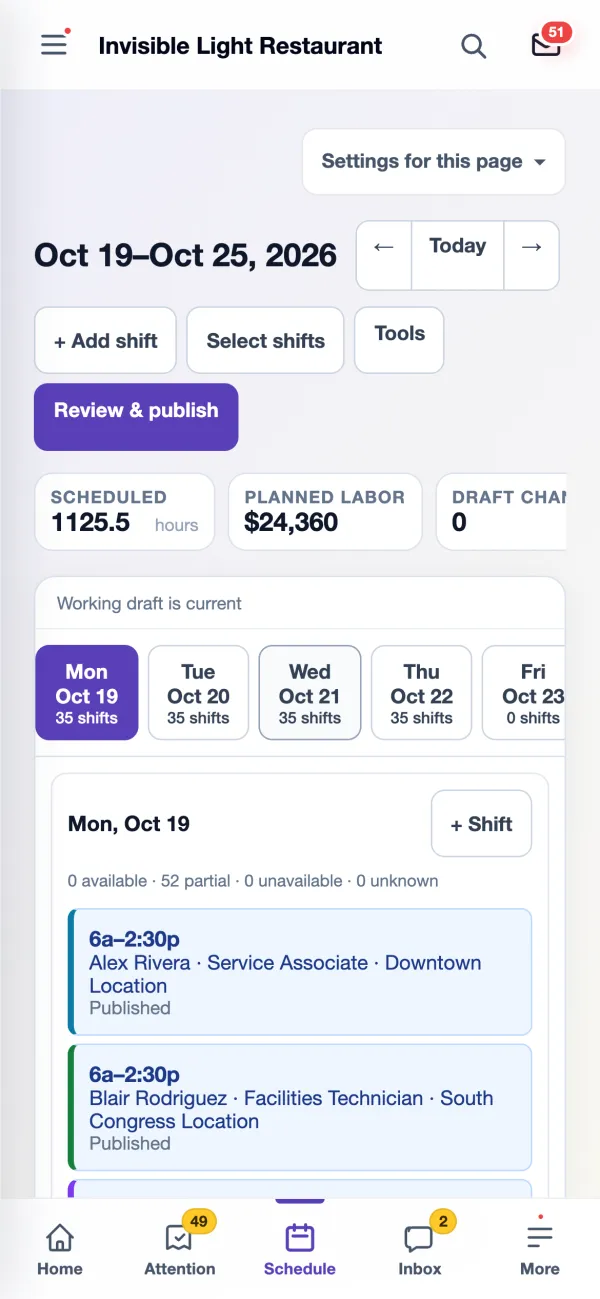
The team schedule on a manager's phone with a day picker, + Shift, and Review & publish
For managers

Open a shift and see who fits

The shift editor lists the best people for the job, with their availability and their hours after the shift. Add planned breaks, notes and checklists, or leave it as an open shift that coworkers can ask for.
  • Suggested people come from availability, time off, the jobs each person can work and hours already scheduled
  • Suggest breaks from your rules, or add your own
  • Approve the first eligible claim automatically on any open shift
The edit shift window with suggested people marked Best fit, their availability and hours after assignment, plus location, notes and planned breaks
For managers

Know what changes before anyone is told

Review & publish shows exactly what employees will see: how many people are affected, shifts added, removed or moved, the hours change, and the week's scheduled hours, overtime and estimated cost.
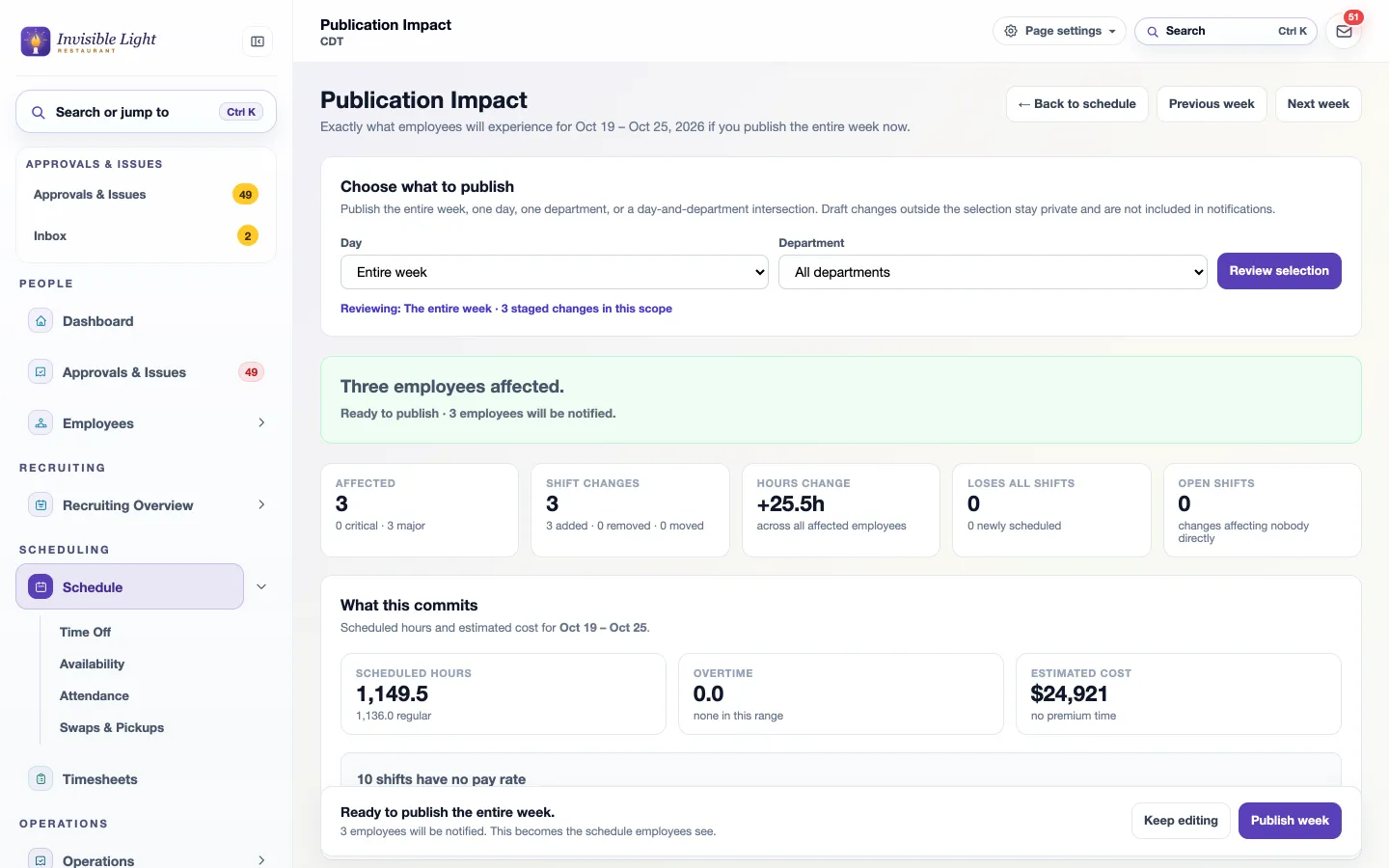
  • Publish the entire week, one day or one department
  • Serious warnings need an "I understand" before you can publish
  • Afterward, see who has opened or confirmed their schedule
Publication Impact: three employees affected, three shifts added, plus 25.5 hours, and the week's hours, overtime and estimated cost before publishing
For employees

Their week, in their pocket

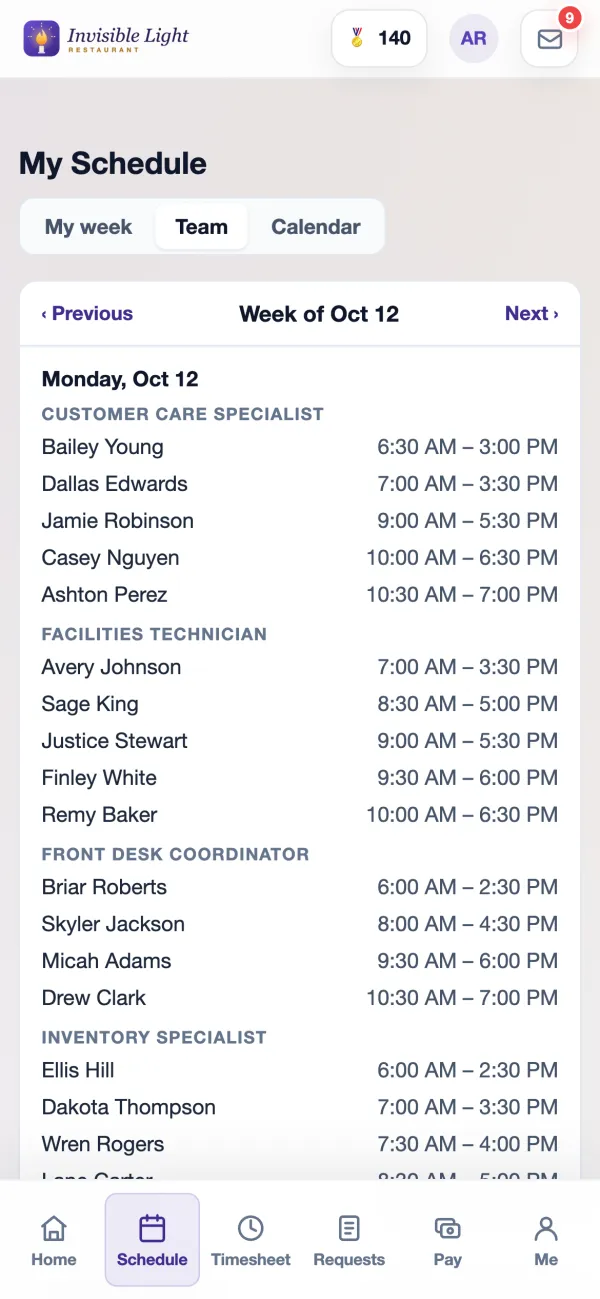
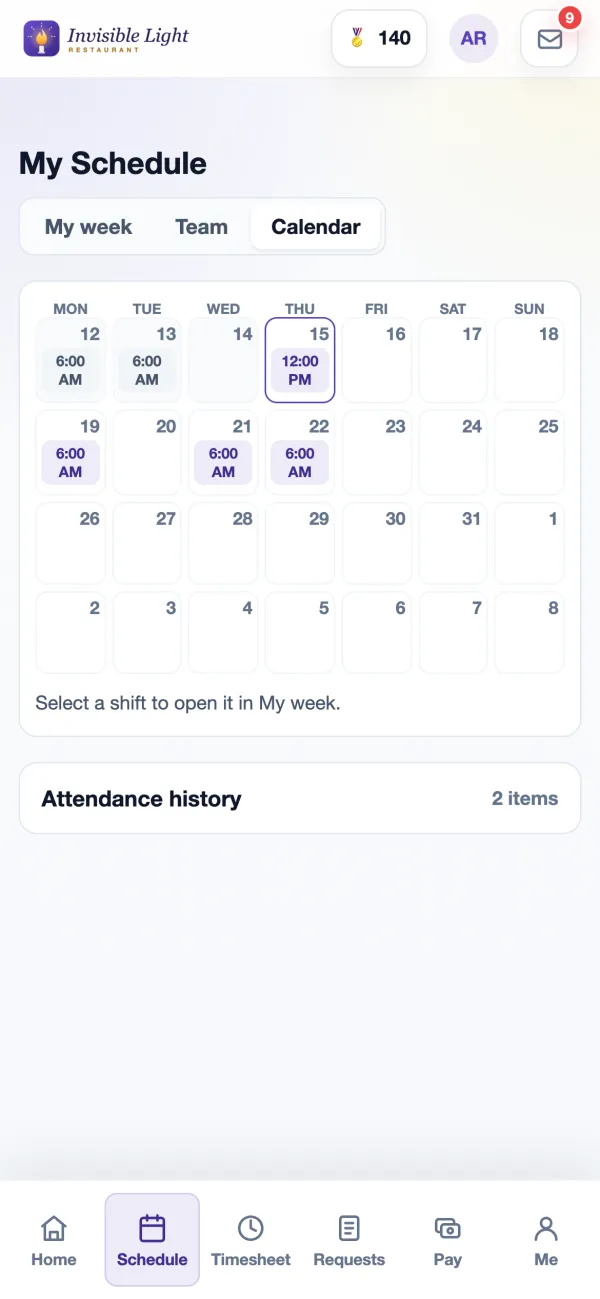
My week shows this week and the next three, with total hours first. Team shows who else is working each day. Calendar shows four weeks at once. Select any shift to confirm it, trade it, give it away, add it to a calendar or call out.
  • Past shifts say Worked, Missed or Called out
  • Their next shift sits at the top of Home
  • They only ever see shifts you have published
My week in the AppyShift app with 25.5 hours this week and each shift marked Worked, Called out, Now or Upcoming
The Team view in the AppyShift app listing who works each day by job, with times
The four-week calendar in the AppyShift app with today outlined
For everyone

Availability that feeds the schedule

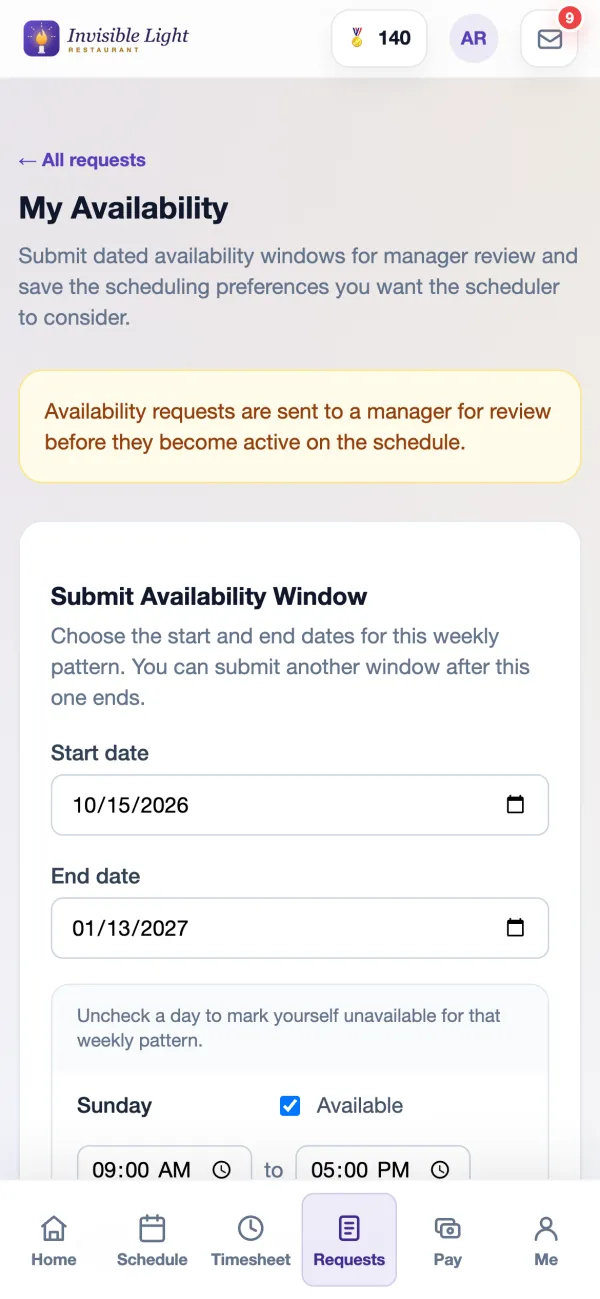
Employees send dated weekly availability and their preferences from the app. You approve or deny each change with a note, or let changes apply right away. Suggestions and Forecast builder use the approved hours.
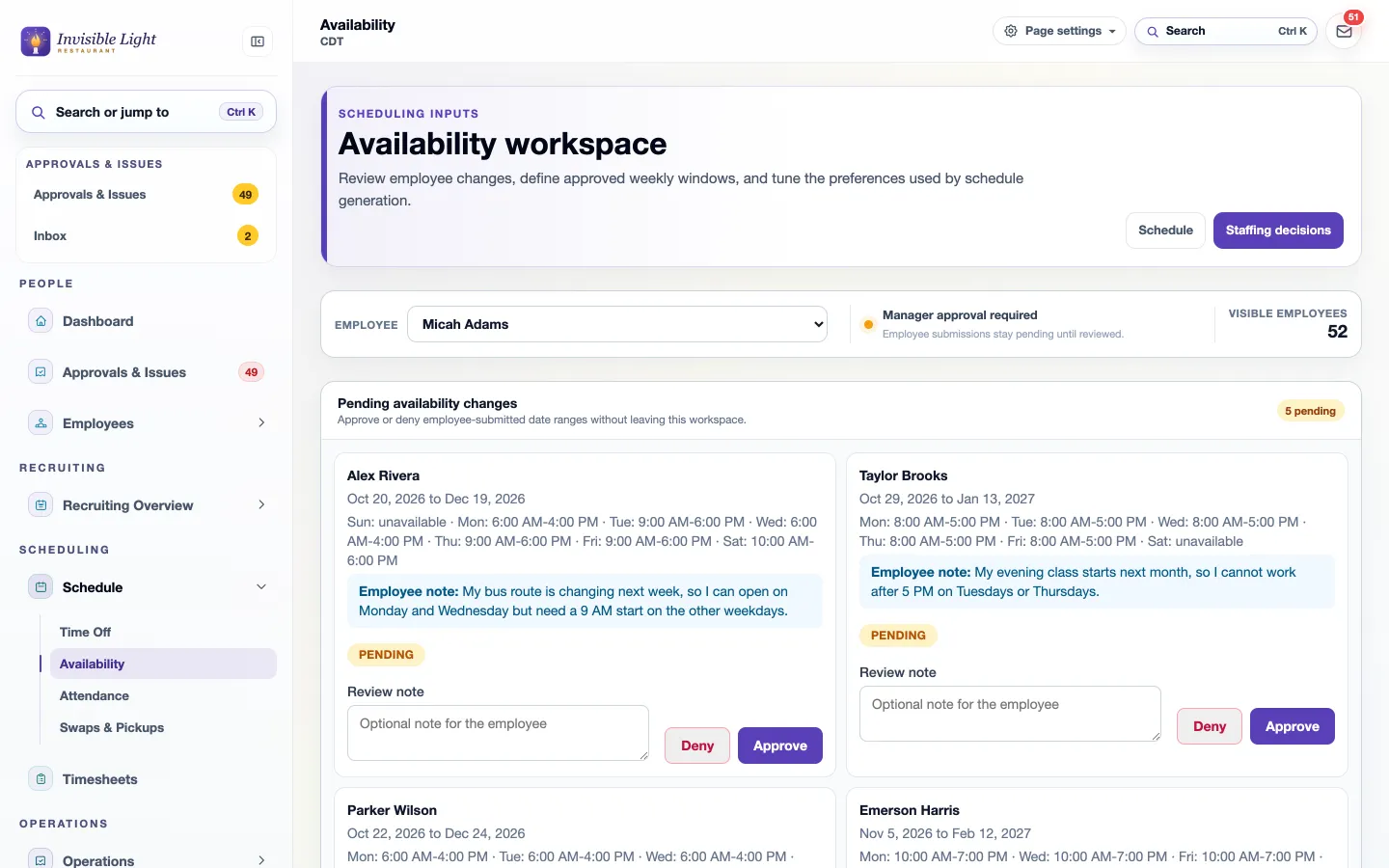
  • Weekly windows, scheduling preferences and request history for each person
  • Preferred days, times, shift length, jobs and locations help rank people who could all work a shift
The availability workspace with pending availability changes, each employee's note and Approve and Deny buttons
My Availability in the AppyShift app: submit an availability window with start and end dates and each day's hours
For managers

Your state's rules, checked on every shift

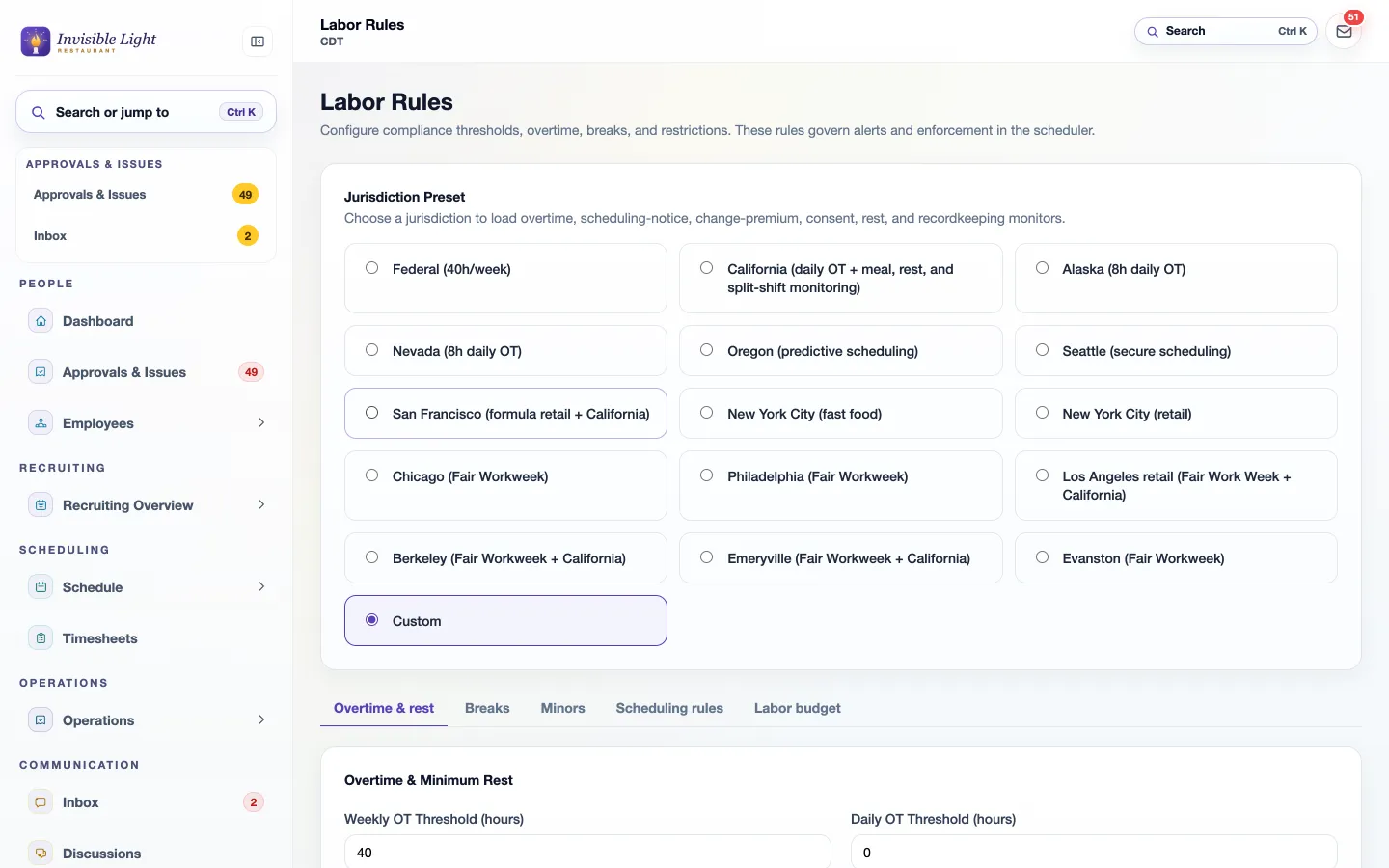
Choose a preset such as Federal, California, Oregon, Seattle, Chicago or New York City, or set your own numbers. Each shift is checked as you add or change it, and Fill open shifts skips anyone who would break a rule you set to block.
  • Daily and weekly overtime, double time and the seventh-day rule
  • Minors' hours by the age your state uses, consecutive days and clopening rest
  • Fair workweek notice and predictability pay estimates where they apply
Labor Rules with jurisdiction presets for Federal, California, Oregon, Seattle, New York City, Chicago and more, and tabs for overtime, breaks, minors and scheduling rules
For managers

Print the day for the back room

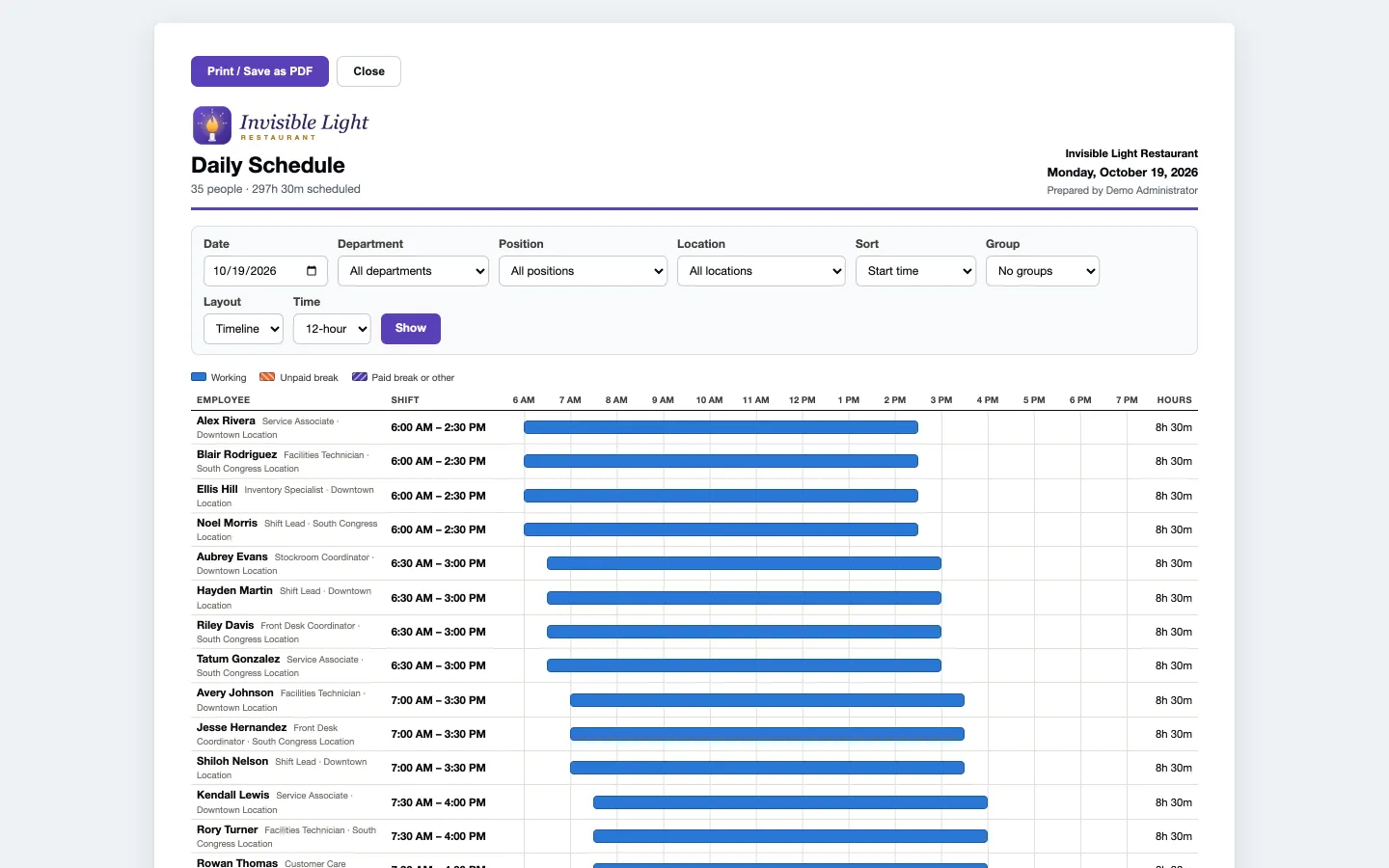
The daily schedule prints on one landscape page: a chart of who works when, planned breaks, open shifts and the day's totals. Or print each person's week on their own page.
  • Pick the date, department, job or location before printing
  • 12-hour or 24-hour times
A printable daily schedule with the company logo and a bar chart of each employee's shift across the day

Callout coverage

For employees

Calling out takes two taps

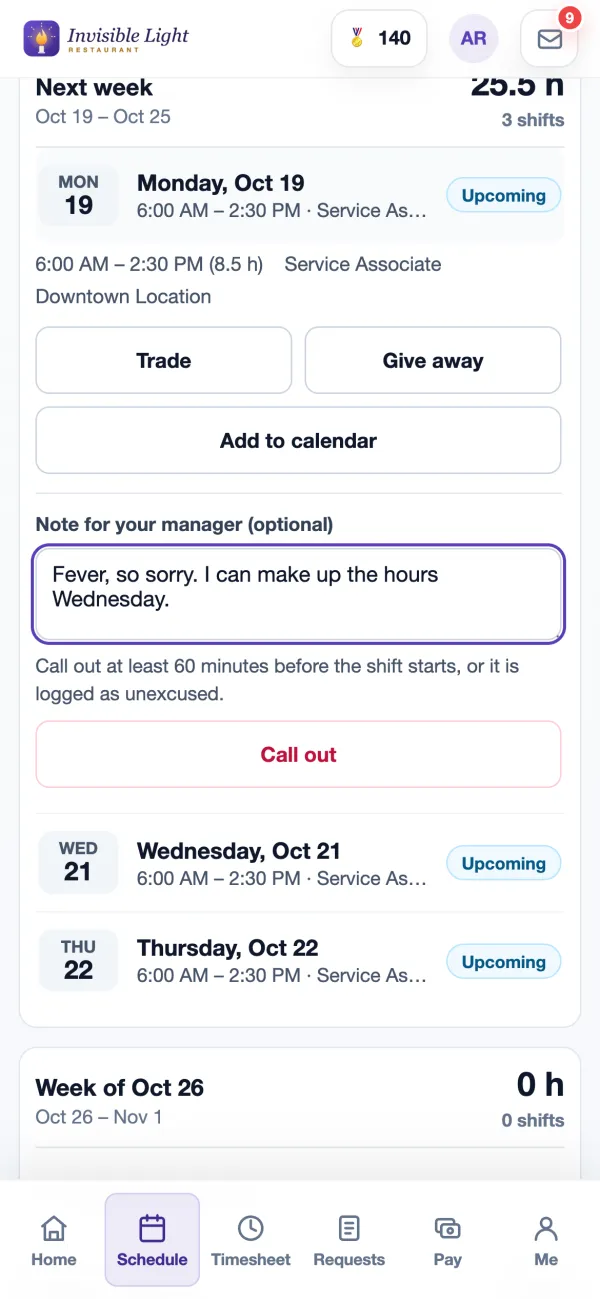
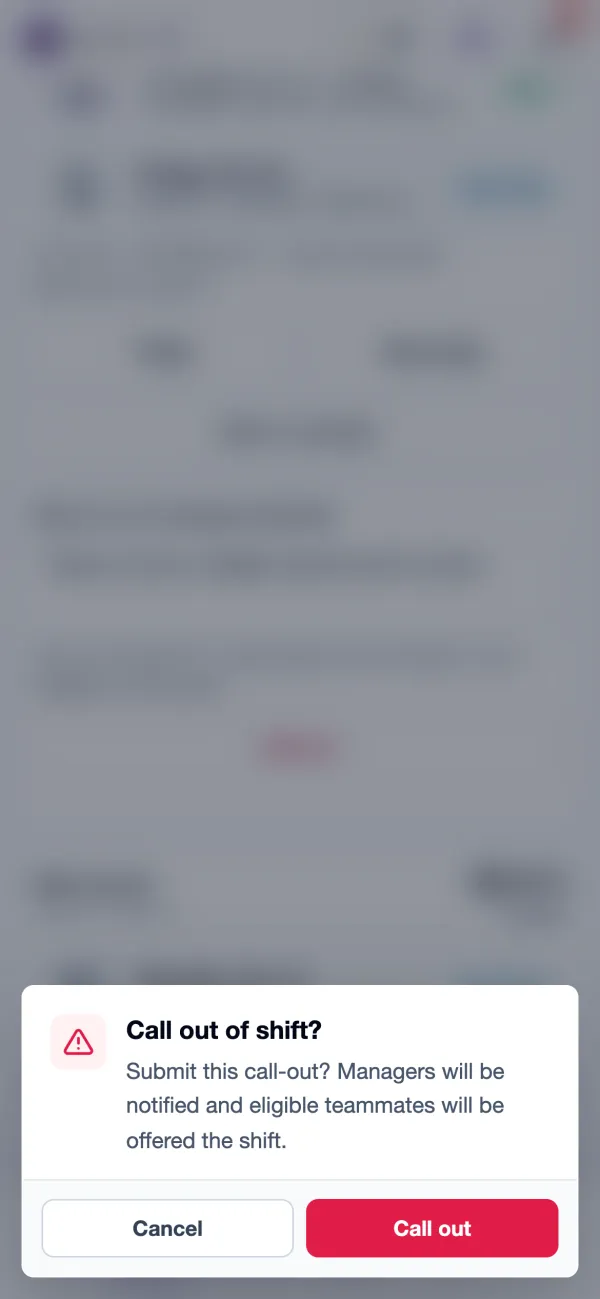
Alex opens Monday's shift, adds a note and selects Call out. The app checks once before it sends, then tells the manager and offers the shift to coworkers who can work it.
  • A note for the manager goes with the call-out
  • The app shows the notice your company asks for, and still accepts a late call-out with a warning
  • Once a shift has ended, it can't be called out of in the app
A shift opened in the AppyShift app with Trade, Give away, Add to calendar, a note for the manager and the Call out button
The app asking the employee to confirm the call-out: managers will be notified and eligible teammates will be offered the shift
For employees

No app open? A text works too

Employees who get AppyShift text alerts can text CALLOUT and a reason for a shift in the next 36 hours, or LATE for one in the next 6 hours. Coworkers can reply CLAIM to an open-shift text, and a manager can reply APPROVE.

  • If someone has two shifts coming up, AppyShift asks which one
  • A CALLOUT text is a message to the manager; the schedule changes only when the shift is reposted or reassigned
  • Texts are optional: alerts also go to the app and by email
Invisible Light Restaurant via AppyShiftText Message
Tue 5:42 AM
CALLOUT fever, so sorry
Delivered
AppyShift: We told your manager at Invisible Light Restaurant you can't make Tue 9/29 6AM-2:30PM. You're still on the schedule until they change it, so check with them.
Invisible Light Restaurant via AppyShiftText Message
Tue 5:44 AM
AppyShift (Invisible Light Restaurant): Open shift Tue 9/29 6AM-2:30PM Service Associate. Reply CLAIM or tap www.appyshift.com/r/… Reply STOP to opt out.
CLAIM
Delivered
AppyShift: Request sent. Your manager will approve it and you will get an update.
For managers

Every call-out arrives with its replacements

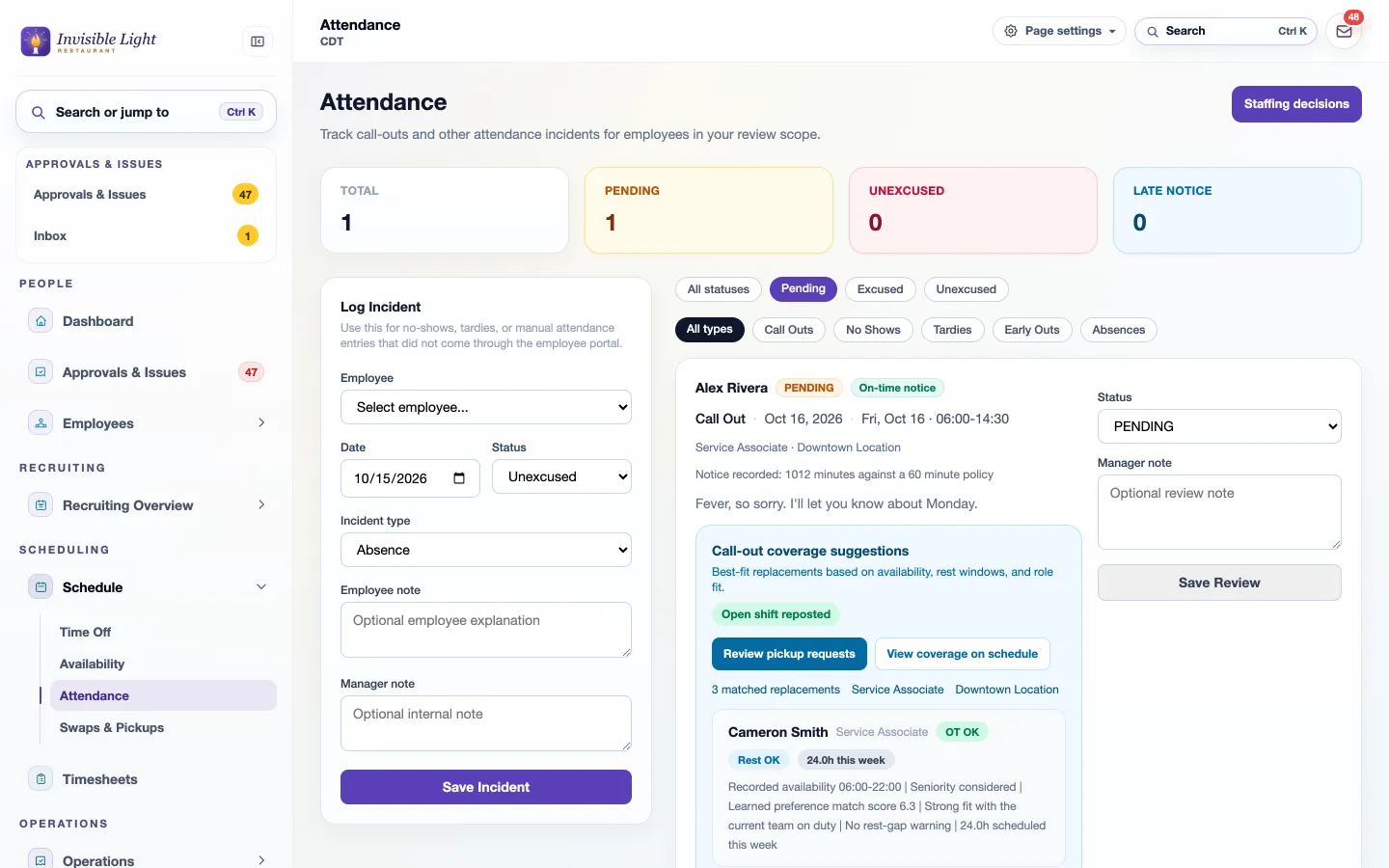
The call-out shows the notice given against your policy, the employee's note and whether the shift is already reposted. Below it are the best replacements, with their hours this week and any overtime or rest warning.
  • Repost coverage with one button if the shift is still assigned
  • Review pickup requests, or check coverage on the schedule
  • Mark the call-out excused or unexcused and add a note
A pending call-out with call-out coverage suggestions: open shift reposted, review pickup requests, and matched replacements with OT OK and Rest OK
For managers

Offer it to the best matches first

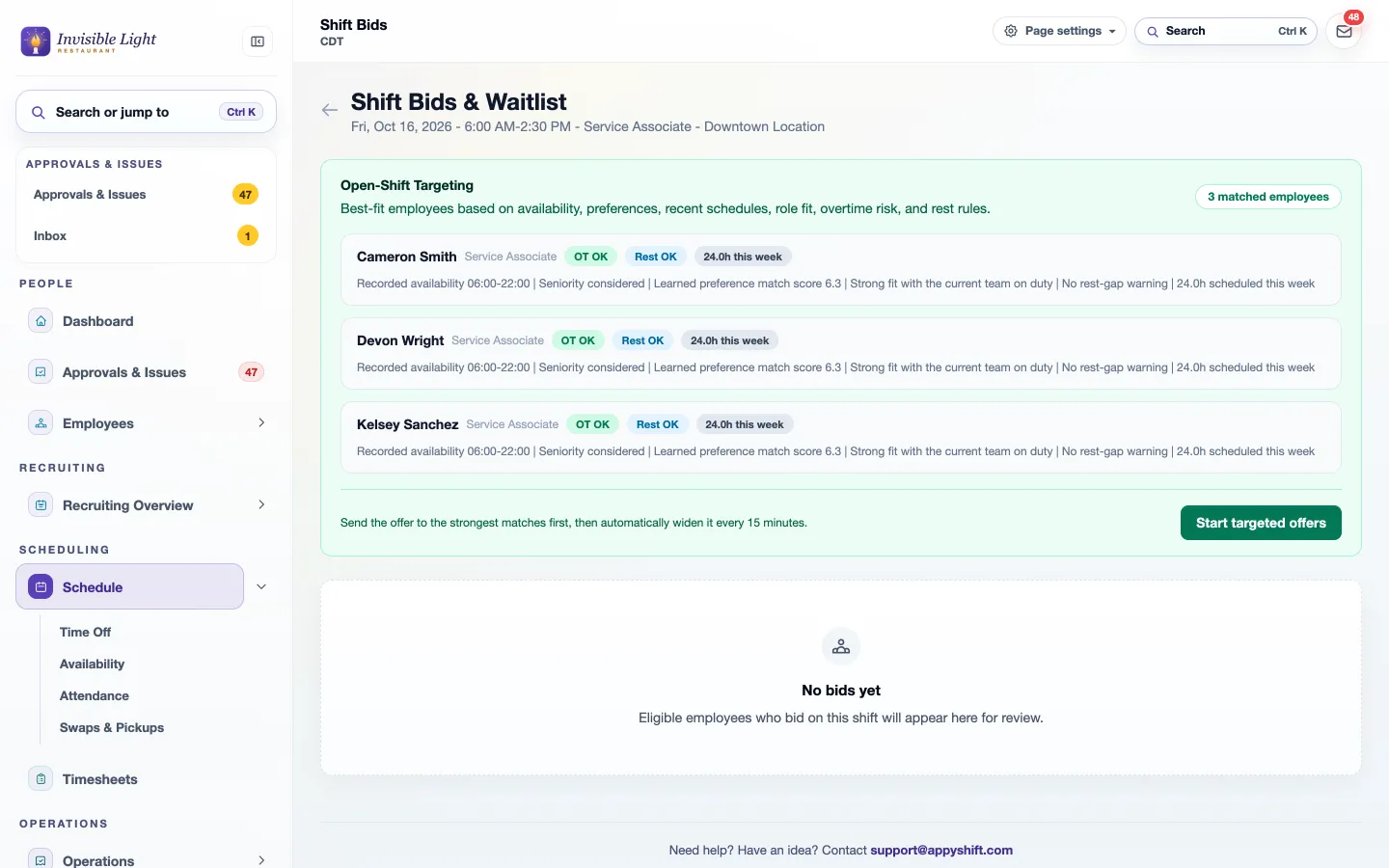
Open-Shift Targeting ranks the people who fit using availability, preferences, recent schedules, the job, overtime risk and rest rules. Start targeted offers and the strongest matches hear first; every 15 minutes the offer widens until someone takes it.
  • Each match says why: recorded availability, hours this week, no rest-gap warning
  • Overtime and rest are checked before anyone is offered the shift
Open-Shift Targeting with three matched employees, each marked OT OK and Rest OK with hours this week, and a Start targeted offers button
For employees

Coworkers see the shift, and what it does to their week

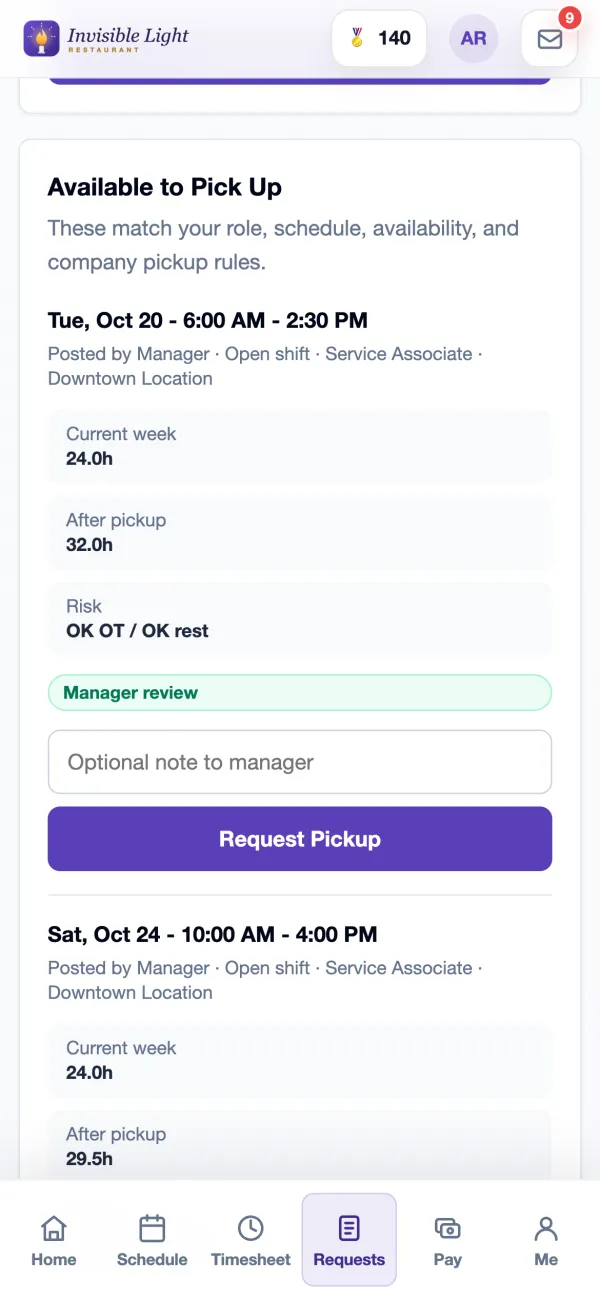
Available to Pick Up lists only shifts that fit the employee's job, schedule and availability. Each one shows their hours this week, their hours after the pickup, any overtime or rest risk, and whether a manager approves it or it's added right away.
  • Request a pickup with a note for the manager
  • Trade with a coworker or give a shift away from the same page
  • Your posted shifts and incoming requests are listed below
Available to Pick Up in the AppyShift app: an open Service Associate shift with current week 24 hours, 32 hours after pickup, OK overtime and rest, and a Request Pickup button
For managers

Pick from the bids, at a desk or on your phone

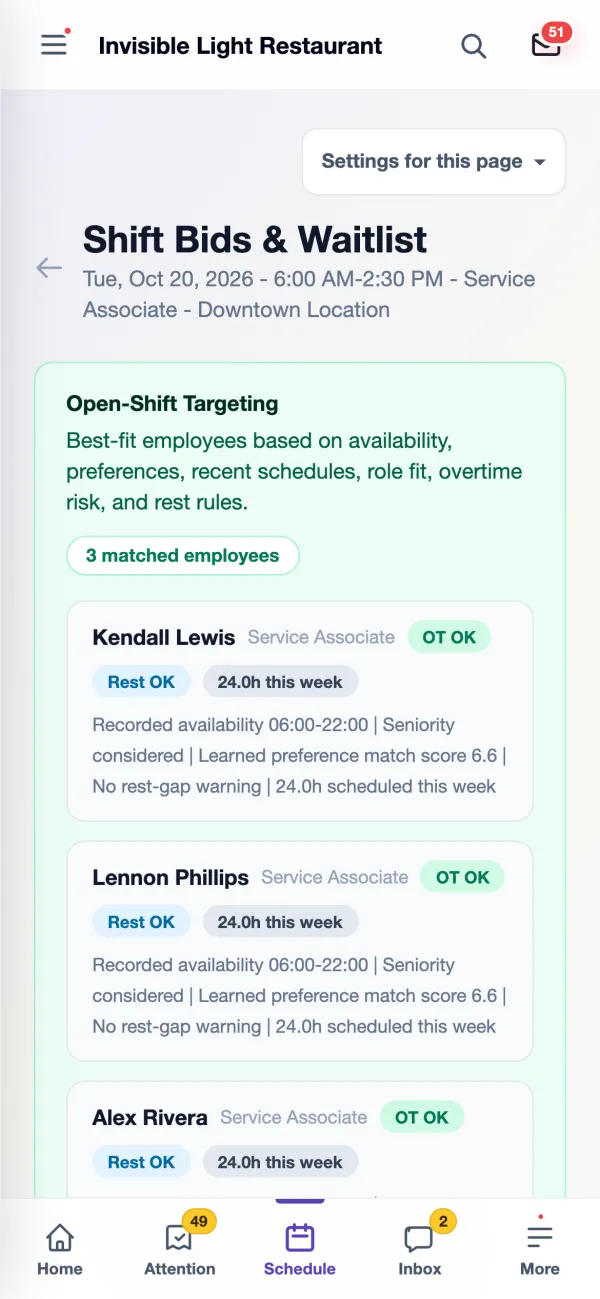
Everyone who asked for the shift is listed with their rank, fit score, availability, rest and overtime check, and the note they left. Assign it, waitlist someone as a backup, or decline. Both sides are told right away.
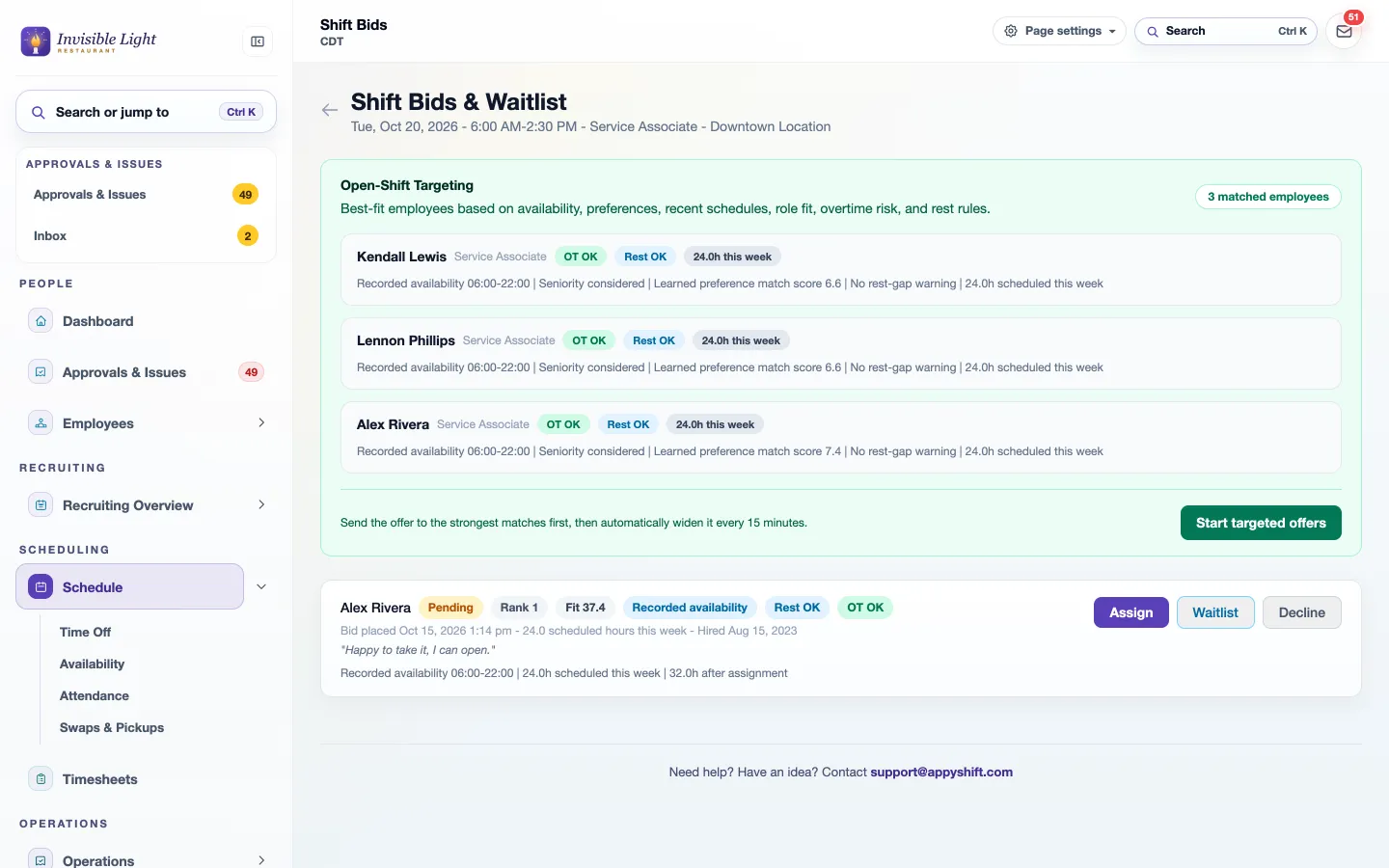
  • Hours after assignment are shown before you decide
  • The same page works on a phone
  • Approvals & Issues counts every open shift waiting on you
A bid on an open shift with rank 1, fit 37.4, recorded availability, Rest OK and OT OK, the employee's note, and Assign, Waitlist and Decline buttons
Shift Bids & Waitlist on a manager's phone with Open-Shift Targeting and matched employees
For managers

Your call-out policy, written into the app

Set the minimum notice in minutes, turn automatic repost on or off, and choose when pickups need you: always, or only when they would push someone past your overtime threshold.
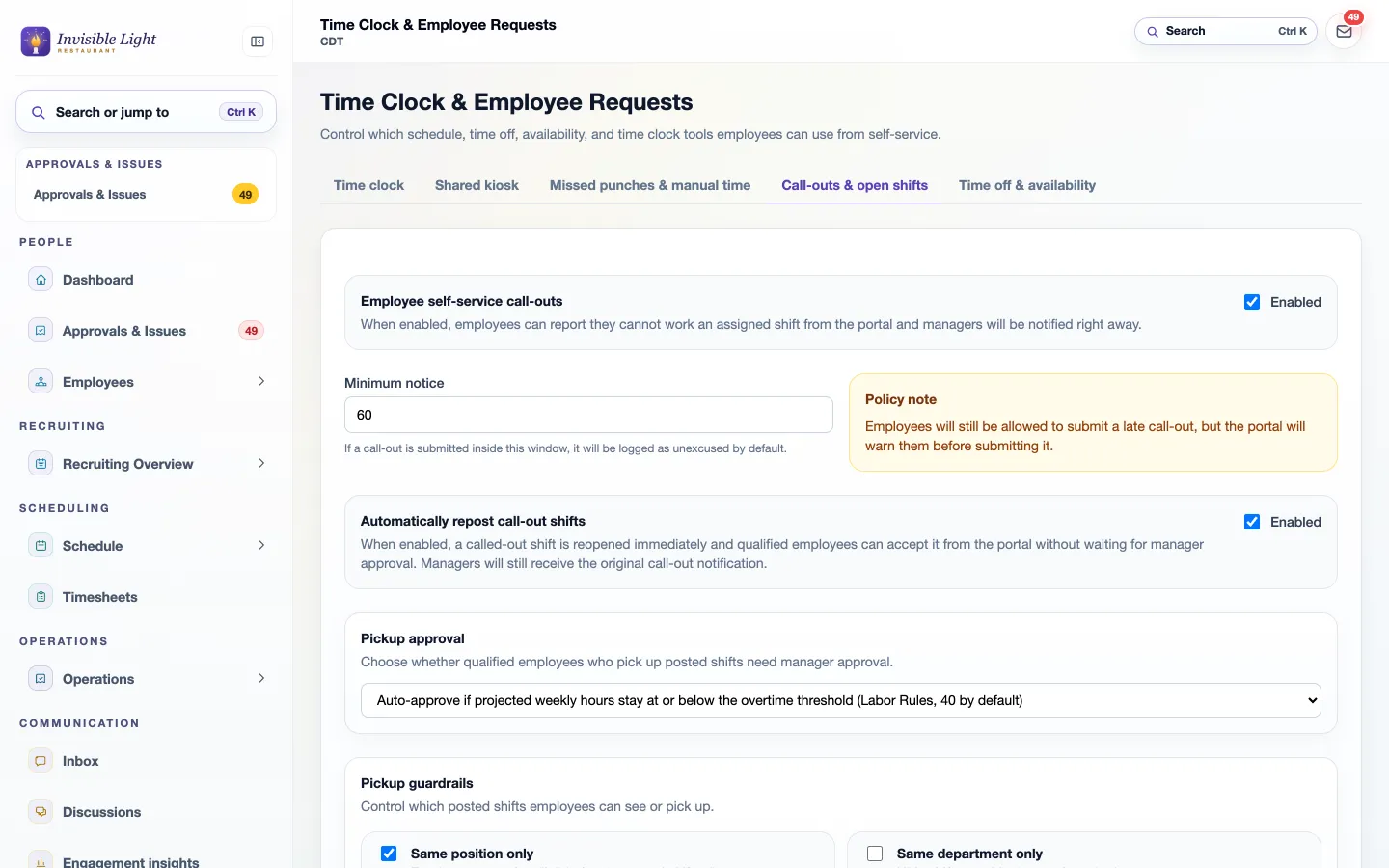
  • Pickup guardrails: same position, same department, same location, block overtime pickups
  • Minimum notice and expiry for posted shifts, and whether eligible employees are notified
  • Who reviews call-outs follows your request routing
Call-out settings: employee self-service call-outs, a 60-minute minimum notice, automatic repost of call-out shifts, pickup approval and pickup guardrails

Every feature, by plan

Everything in AppySchedule

Included in every plan. Some features are for certain industries and are turned on in setup.

  • Schedule builder Every plan Build and publish the week with shift templates and an auto-built first draft.
  • Availability Every plan Employees set when they can work, and managers see it while scheduling.
  • Open shifts and shift swaps Every plan Employees pick up open shifts and trade shifts, with manager approval.
  • Callout coverage Every plan Employees call out in the app, and the shift is offered to people who can cover it.
  • Break planning Every plan Plan paid and unpaid breaks with suggested times that keep the floor covered.
  • Schedule change alerts Every plan Employees are told when their shifts move or change.
  • Labor budget Every plan Compare scheduled labor with sales and your labor budget.
  • Departments, positions, and locations Every plan Schedule and report by team, role, and site.
  • Home care visits Every plan Clients, visits on the schedule, caregiver check-in at the home, travel, and mileage.
  • Visit watch Every plan Late and missed visits flagged as they happen, with a fast way to send a replacement.
  • Authorizations and visit records Every plan Track authorized hours for each client and keep visit check-in records.
  • Census-based staffing Every plan Staff each unit from its resident count, with PBJ staffing reports and the quarterly PBJ file for CMS.

Compare every module and plan

Try AppySchedule free

Enter your work email to begin your free-trial signup.

Open full signup
No credit card required Complete account setup next

Questions about AppySchedule

Do employees see my changes while I'm still building?

No. New and changed shifts are drafts until you publish. Then only the people whose shifts changed are told, in the app, by email, and by text if they turned texts on. Restore last published throws away drafts you don't want.

Can AppySchedule build the schedule for me?

It can draft it. Forecast builder proposes shifts from a demand forecast or the days, times and headcount you need, using availability, time off, the jobs each person can work and hours already scheduled. You review the preview, change what you like and create only the shifts you want.

How does it stop overtime and rule breaks?

The week shows overtime risks as you build, and each shift lists the person's hours after it. With Labor Rules (Pro plan), overtime, rest between shifts, minors' hours, consecutive days and clopenings are checked on every shift and set to warn or block.

Can I build the schedule on my phone?

Yes. Pick a day, add a shift with its date filled in, select several shifts to assign, make open or delete, and review and publish, all from a phone.

What happens the moment someone calls out?

Their manager gets an alert, the call-out is logged in Attendance with how much notice was given, and, if automatic repost is on, the shift reopens for coworkers who can work it. With repost off, the person stays on the schedule until a manager reposts the shift or gives it to someone else.

Who is offered a called-out shift?

Coworkers who can work that job, aren't already working then, and pass your pickup rules, such as the same position, location or department and your overtime limit. Targeted offers go to the best matches first and widen every 15 minutes. The person who called out isn't offered their own shift.

Can a coworker take the shift without me approving it?

Only if you allow it. Pickups can be approved automatically while the person stays at or under your overtime threshold, or you can tick "approve the first eligible claim" on one open shift. Otherwise every pickup waits for a manager.

Can employees call out or swap shifts by text?

Employees who turned on AppyShift text alerts can text CALLOUT and a reason for a shift in the next 36 hours, or LATE for one in the next 6 hours, and reply CLAIM to an open-shift text. Trades and give-aways happen in the app, where you approve each change with the hours and any overtime or rest warning in front of you.

Which plan includes AppySchedule?

AppySchedule is in every plan, with all of its features. Also on this page: points, badges and rewards, on the Pro plan.

Keep exploring

Module

AppyTime

Time and attendance that tracks every hour and gives managers what they need to manage hourly labor.

See AppyTime →
Module

AppyConnect

Team communication that keeps managers and employees connected, with two-way texting that reaches hourly workers without another workplace app.

See AppyConnect →
Free resource

Employee Availability Form Template

Use the weekly form to record an effective date range, available hours, and shift preferences, then share or export a copy for your manager.

Open the resource →
Free resource

Time Card Calculator with Breaks and Overtime

Enter each shift and unpaid break to calculate regular hours, overtime hours, decimal totals, and an optional gross-pay estimate. Everything stays in your browser.

Open the resource →

See AppySchedule with your own team.

14 days free with every Pro feature. No credit card. Or open the demo first and click around.

Start free trial