Reviews written beside the facts, not from memory.
Performance reviews for hourly teams, written beside the hours, attendance and training AppyShift already keeps. Each company sets its own steps: a self-review, who writes it, who approves it, a pay change, a meeting and signatures. Employees do their part on their phone.
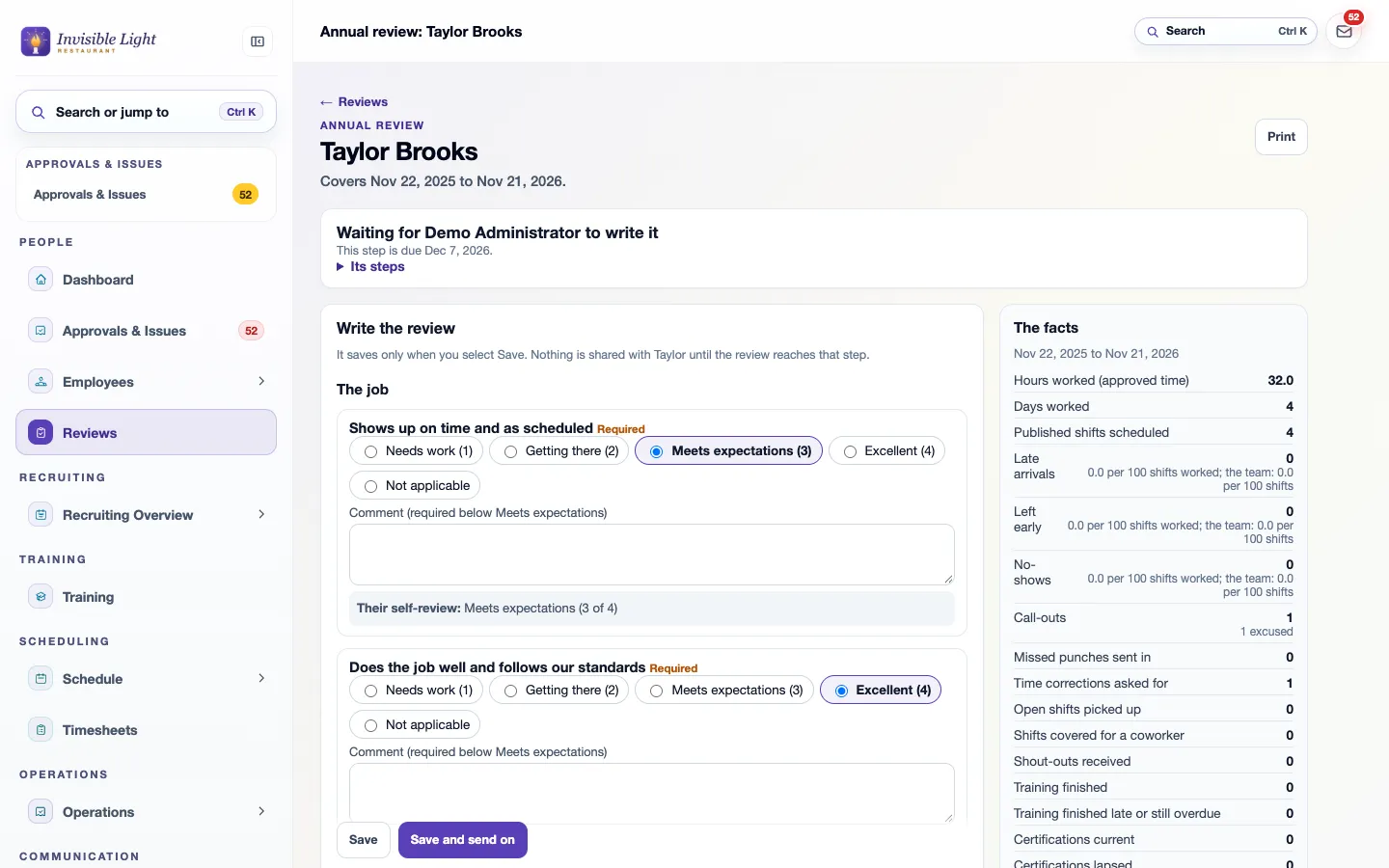
The facts for the periodHours and days worked, late arrivals, early outs, no-shows, call-outs, missed punches, shifts picked up, shout-outs, training and certifications, beside the form.
Their self-review alongsideWhen the steps include a self-review, the writer sees the employee's own answer under each question.
Compared with the teamIf you turn it on, attendance is shown beside the department's, only when there are at least five others to compare with.
Help writing itWith AI turned on, draft from your notes or make a review kinder or clearer. You read it and decide what to keep.
Your reviews, your steps
Ready-made reviewsNew hire check-in, quick check-in, annual review, end-of-season and manager or lead reviews, each yours to change.
Your own questionsRatings on your scale, yes or no, choices, written answers, goals, an overall rating and a private note for managers and HR.
Each company's own stepsA self-review, who writes it, who approves it or sends it back, a pay change, a meeting, sharing, signatures and a final lock.
Opened on timeOpen reviews by hand or in rounds, or set a rule: days after hire, each work anniversary, set dates or the end of a season.
Pay changes and goals
Pay changesThe writer can propose a new rate and the day it starts. Someone who can change pay approves it or not, never the person who proposed it, and it is saved to the profile on that day.
Goals that carry overGoals from a review show in the employee app and are marked at the next review. A goal tied to a course or certification is ticked when it's finished.
After the reviewWhen a review is completed: set eligible for rehire, add a goal, assign a course, give a shout-out, open the next review or tell people.
For employees and HR
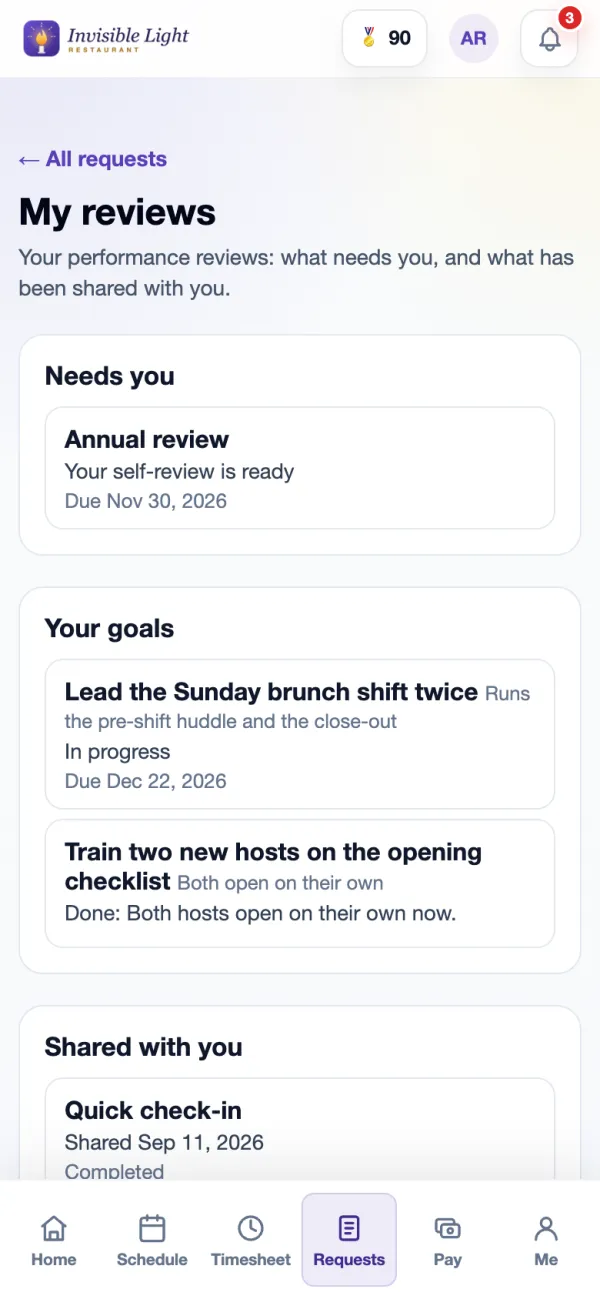
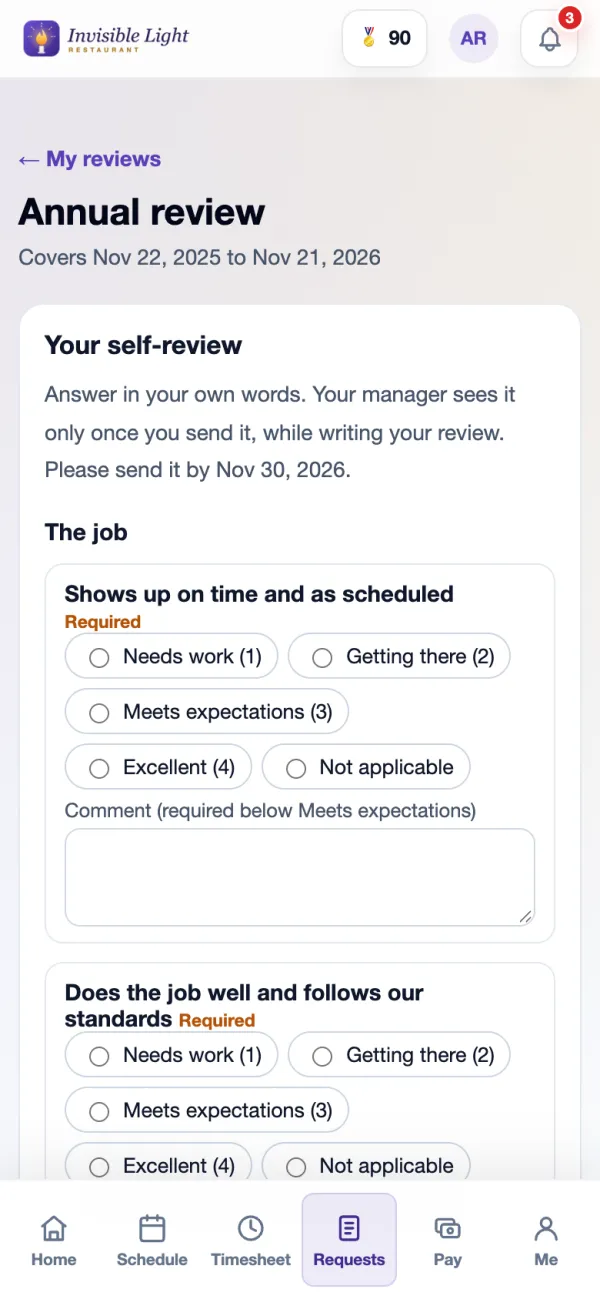
In the employee appEmployees do their self-review, read their review once it's shared and sign it, on their phone.
Signatures with a recordDrawn or typed, kept with what was signed. An employee can decline to sign and say why.
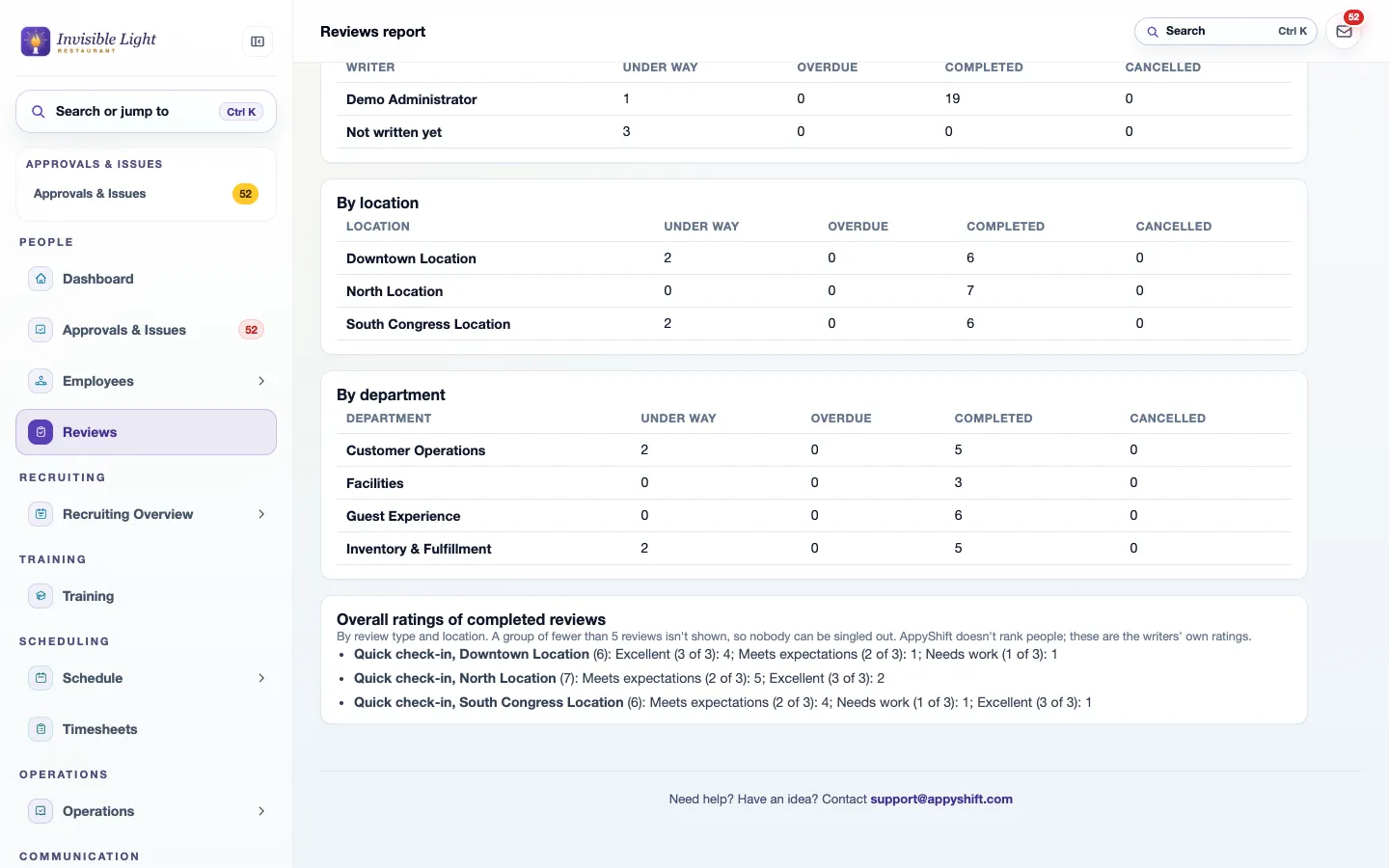
ReportsWhere every review is, by writer, location and department, and overall ratings for HR and company admins, with any group under five hidden.
See all 14 featuresShow fewer
See it in the app
How it looks at a desk and on a phone
Every screen here is a real AppyShift page from our demo company, Invisible Light Restaurant.
For managers
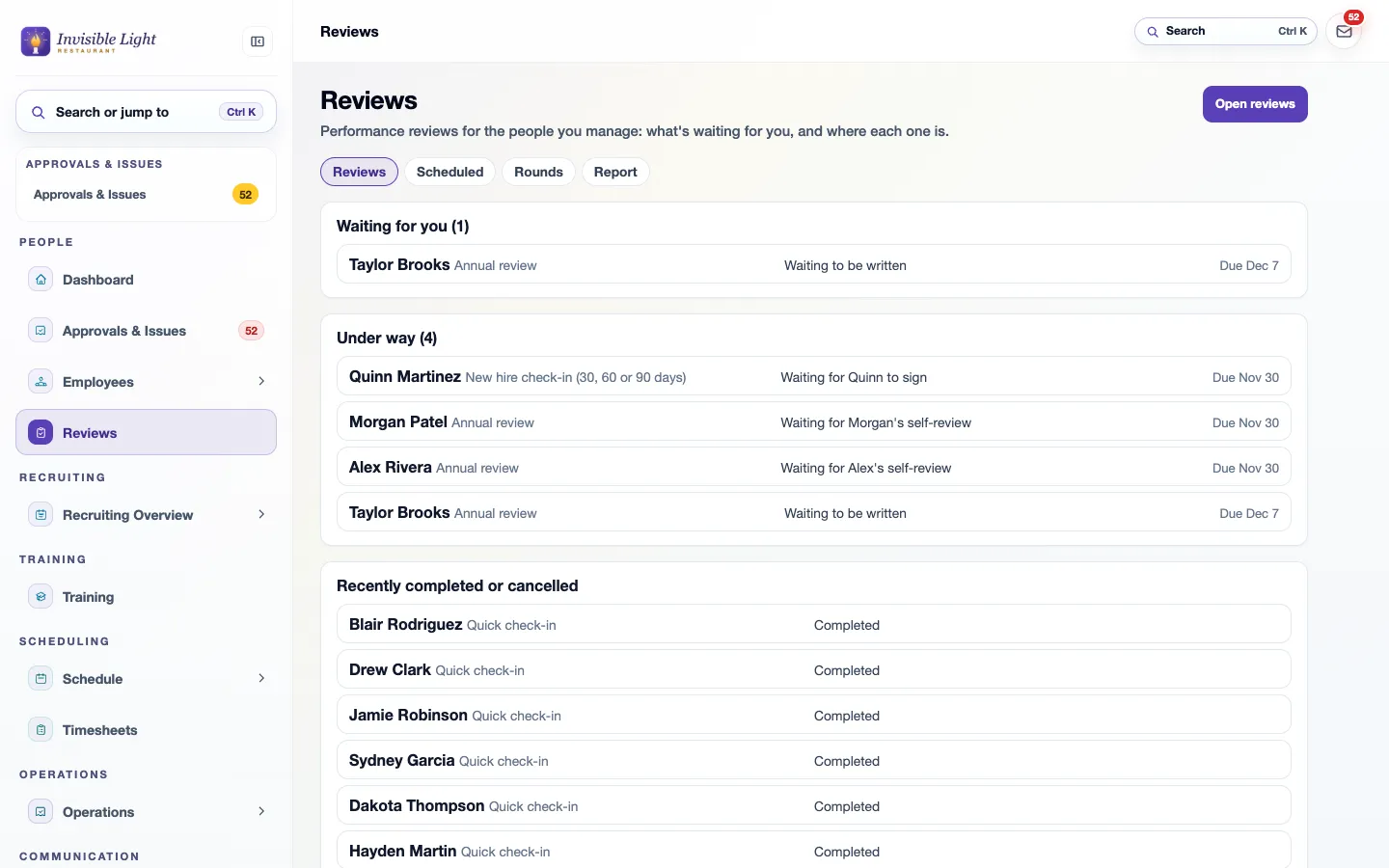
What's waiting for you
Reviews shows each manager the reviews waiting for them, and where every other one is: a self-review to come, one to write, approve or sign.
A due day on every step
A reminder when a step is late
Only the people you manage
Reviews
For managers
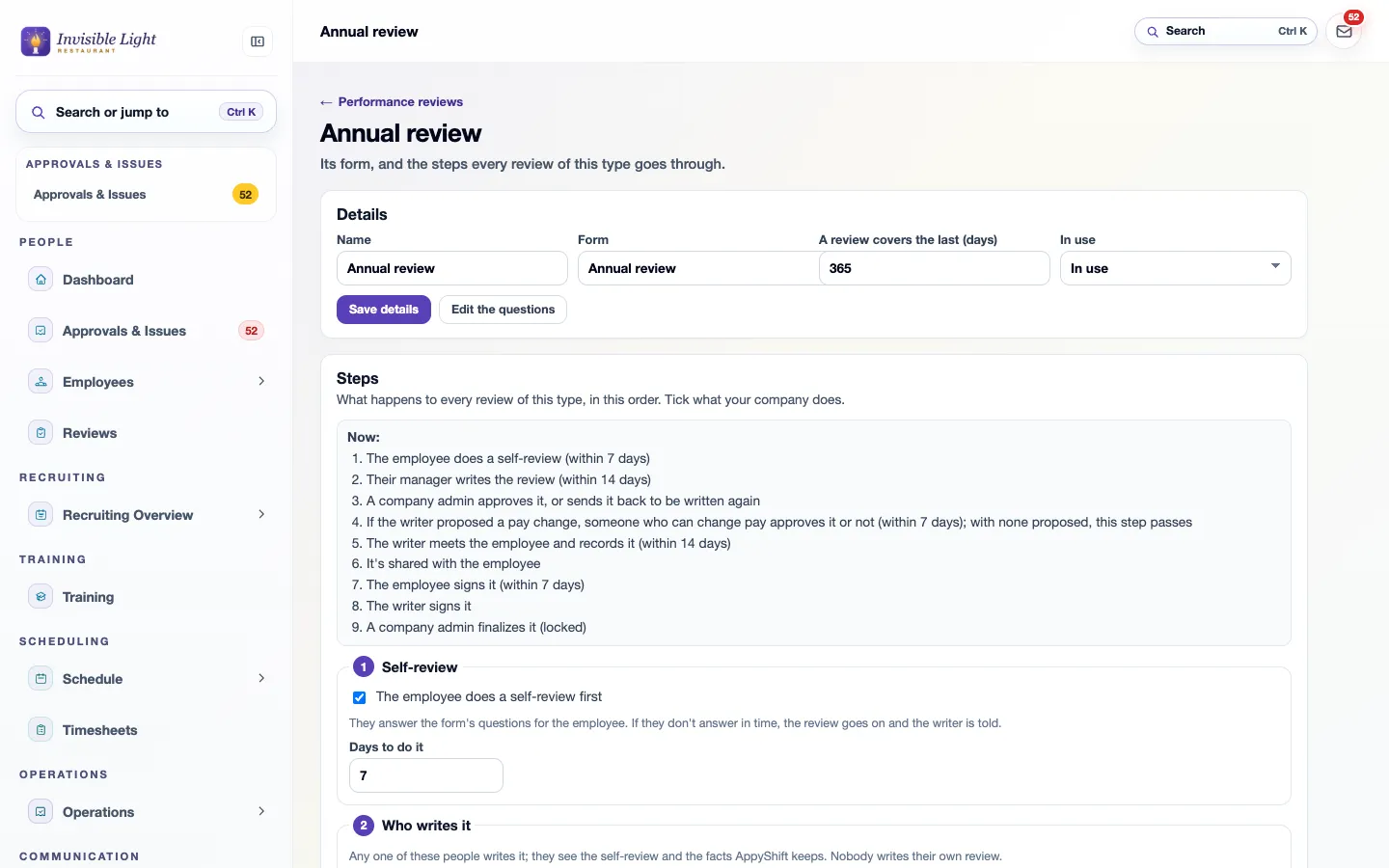
Your steps, in your order
Each review type has its own steps. Tick what your company does, and every review of that type follows them: nothing is shared, signed or finalized until it reaches that step.
Sent back with a reason when it needs changes
Days to do each step
A pay change decided before it's shared
Settings · Performance reviews · Annual review
For employees
Their side, on their phone
Employees do their self-review in the app, read the review once it's shared with them, and sign it or say why they won't. Their goals are there too.
Their manager sees the self-review once it's sent
Private notes for managers and HR are never shown
Drawn or typed signature
For managers
See where reviews stand
The report counts reviews under way, overdue, completed and cancelled, by writer, location and department. HR and company admins also see the overall ratings of completed reviews.
Groups of fewer than five are never shown
The writers' own ratings, never a ranking
Download it as a CSV
Reviews report
Every feature
Everything in AppyReview
Included from the Pro plan up. Some features are for certain industries and are turned on in setup.
Review formsReady-made forms (new hire, quick check-in, annual, end of season, lead) and your own questions and rating scales.
Your own review stepsSelf-review, writing, approval, a meeting, sharing, signatures and finalizing, in the order you choose for each kind of review.
The facts beside each reviewHours, attendance, shifts picked up, training and certifications in the review period. You decide what they mean.
Reviews that open on their ownAfter hire, on work anniversaries, on dates you set or at the end of a season, for one person or a whole group.
Goals and pay changesGoals that tick themselves when a course or certification is done, and raises that change nothing until someone who can change pay approves them.
Reviews in the employee appEmployees answer their self-review, read what is shared with them, sign and comment on their phone.
AI writing helpOptional: a first draft from the answers and the facts, or a kinder or clearer rewrite, with AI credits.
No. Start from a ready-made review (new hire check-in, quick check-in, annual, end-of-season, or manager or lead) and change its questions and steps. The facts for the period are beside the form while you write.
Can a review include a raise?
Yes, when its steps include a pay change. The writer proposes the new rate and the day it starts, and someone who can change pay approves it or not, never the person who proposed it. An approved raise is saved to the employee's profile on that day.
When does the employee see it?
When it reaches the Shared step, never before. Private notes for managers and HR are never shown to them.
Can reviews open on their own?
Yes. Set a rule (days after hire, each work anniversary, set dates or the end of a season) and reviews open on the day. A round of more than 200 people waits for someone to confirm it.
Does AppyShift rate or rank my team?
No. The ratings are your writers' own. The facts beside the form are what AppyShift recorded for the period, and the report hides any group of fewer than five.
Which plan includes AppyReview?
AppyReview is included from the Pro plan up, with all of its features.
Keep exploring
ModuleAppyTraining →Workplace training your team finishes on their phone: ready-made courses and quick quizzes, with progress, reminders and certificates in one place.
ModuleAppyTime →Time and attendance that tracks every hour and gives managers what they need to manage hourly labor.
Free resourceEmployee Handbook Builder →Choose policy sections, tailor the starter language to your procedures, and assemble a printable handbook draft. Nothing is saved or uploaded.